

UPCOMING BIRTHDAYS
Thanks to Larry Woodruff and JoAnn Ciresi Allen we were notified that John Wisenbaugh passed away June 17, 2024.
I’ve had several classmates comment on how handy the “Send (name) a private message” on the Classmate Profile page is. It sends your message without disclosing your email or you having a classmate’s email. So, this is a great way to get in contact with someone when you don’t have their contact information. As long as they have created a profile, the message will be sent directly and only to them. Contact someone you haven't heard from in years, its fun............surprise them! Give it a try and let me know if you have any questions or suggestions.
.png)
Click for more pictures from the 60th Reunion
or click on the 60th Reunion (add pix here) tab above to view or add pictures you took during the reunion!

I have updated our Supplemental Site, the "Berea Ohio Project"! Lots of old Berea pictures and among other things it includes obituaries from some of our GREAT teachers we were fortunate to have.
Web sites:
Class of 1960 web site,
Class of 1965 web site,
Class of 1967 web site,
Class of 1971 web site and the supplemental site for Berea and Berea High School.
I posted some great "Swim Team" pictures Tom Dameron sent to me. Thanks, Tom! Click on the picture to enlarge it.
Here are some great pictures from the Berea 2012 Community Guide, published by the City of Berea and the Chamber of Commerce.
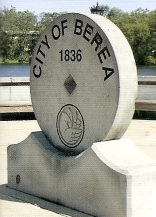
We have added many Fairwood class pictures on the Misc Pix page.
We have added a new feature, Misc Pix, which allows any Class of 1966 classmate to "upload" pictures after they log on to the web site. We hope many of you contribute pictures.
Welcome to the Berea High Class Of 1966 web site. Please spend some time, create your information and let others know about the site, most of all have fun with it!
This site is very interactive. You'll be able to easily add information and photos yourself, contact other classmates, help find classmates, etc. I'm excited about the possibilities! 
Don't forget to check out the Message Forum!
We now have a Guest registration if you want to be a Guest in the '65 or '67 web site or if you know someone that would like to be a "Guest" in this site, let me know. Thanks, Larry Froehlich
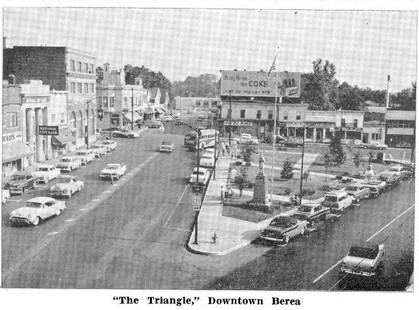
.jpg)
This picture and more (on the Supplemental Site) are from
Dick Curtner, Class of '65. Thanks Dick, these are GREAT photos!
If this is your first visit on our site............click here.
Thanks, Larry Froehlich
To upload pictures: First I would select the photos you want to upload and save them on the computer desktop, this will make them easier to find. Make a note of a picture number if you have not saved it with a particular name.
· Now click on Home Page and click your name in the Profile Updates!
Click to hear the Pride of Berea; the Berea High School Marching Band!
If it’s your first time to the web site, please login by clicking the Classmate Profiles tab, scroll down to your name, click it and enter your current contact information. You can provide as little or as much information as you like without fear of spam. You can set your profile to display your contact information or to keep it private. It's up to you! This website is private and the information in it is not available in search engines, although the website's homepage is.
You can also share personal updates, memories, photos and videos with your classmates here. Enjoy looking at the profiles of old friends and don’t forget to add your own photos and comments. Check back often as classmates will continue to post new photos and updates.
Here is a short Birthday Wish .............. from the 60th Birthday Party/Picnic:
PROFILE UPDATES
| • | Connie Koblenzer (Ratti) 8/20 |
| • | Larry Froehlich 8/16 |
| • | Robert Miller 7/17 |
| • | Rick Jellen 6/22 |
| • | Kathleen Gregg (Beckman) 6/22 |
| • | Cathy Prusha (Rosebrock) 6/21 |
| • | Glen MacLeod 6/17 |
| • | Dave Chrestensen (Chrestensen) 6/15 |
| • | Douglas Good 6/14 |
| • | Robert Larson 5/14 |
 |


IN MEMORY UPDATES
| • | Christine Steinmetz (Stearns) 2026 |
| • | John Wisenbaugh 2024 |
| • | Marcia Meloy (Baer) 2026 |
| • | Bev Kerney 2021 |
| • | Charles Jandecka 2025 |
| • | Joe Sperk 2025 |
| • | Tom Mayer 2024 |
| • | Judy Nungester (Sergent) 2022 |
| • | Tim Bailey 2023 |
| • | Bruce Wetzel 2023 |
|